> ## Documentation Index
> Fetch the complete documentation index at: https://docs.nokia.atlas.arenaphysica.com/llms.txt
> Use this file to discover all available pages before exploring further.
# Populating the System Metagraph
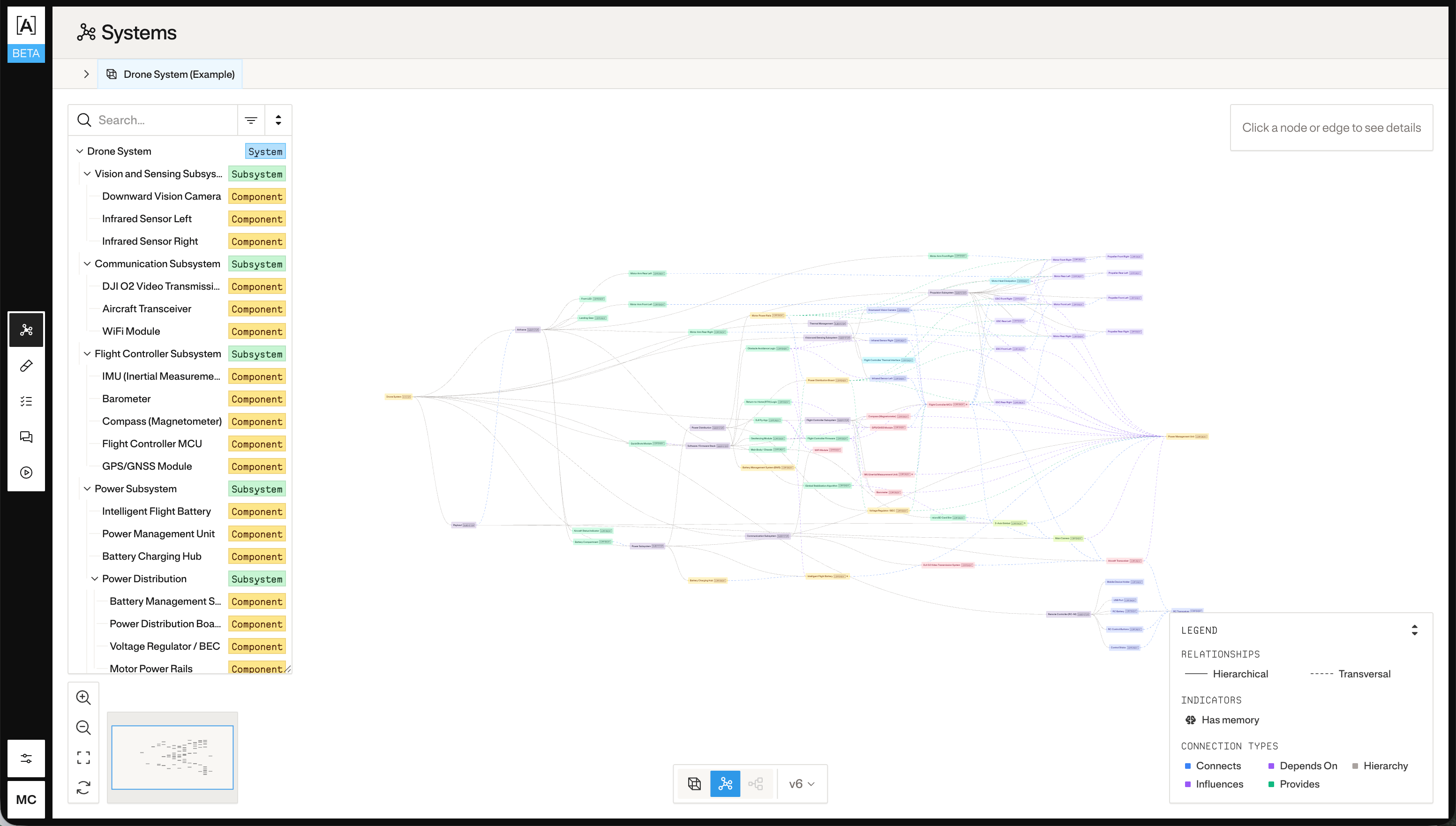
> Upload documents and let Atlas build a structured model of your hardware.
 ## 1. Upload documents to the system
Upload PDFs, schematics, specs, or any reference files that describe your system. Atlas will use these to build the metagraph.
```bash theme={null}
curl -X POST "https://nokia.atlas.arenaphysica.com/api/v1/systems/upload_document?system_id=$SYSTEM_ID" \
-H "Authorization: Bearer $ATLAS_TOKEN" \
-F "file=@system_spec.pdf" \
-F 'metadata={"file_name": "system_spec.pdf", "file_type": "pdf"}'
```
You can upload multiple documents in separate requests. Each becomes part of the system's document store.
## 2. Create a metagraph update job
Create a job that instructs Atlas to read the uploaded documents and update the metagraph.
```bash theme={null}
curl -X POST "https://nokia.atlas.arenaphysica.com/api/v1/jobs" \
-H "Authorization: Bearer $ATLAS_TOKEN" \
-H "Content-Type: application/json" \
-d '{
"job_type": "metagraph_update",
"config": {
"job_type": "metagraph_update",
"system_id_or_name": "",
"additional_context": "Focus on the power distribution subsystem and its interfaces."
}
}'
```
Save the `uuid` from the response:
```bash theme={null}
export JOB_ID=""
```
`additional_context` is optional. Use it to scope or guide the analysis when you have a specific part of the system you want Atlas to model.
## 3. Start the job run
```bash theme={null}
curl -X POST "https://nokia.atlas.arenaphysica.com/api/v1/job-runs" \
-H "Authorization: Bearer $ATLAS_TOKEN" \
-H "Content-Type: application/json" \
-d "{\"job_id\": \"$JOB_ID\"}"
```
Save the `uuid` from the response:
```bash theme={null}
export JOB_RUN_ID=""
```
## 4. Poll for completion
```bash theme={null}
curl "https://nokia.atlas.arenaphysica.com/api/v1/job-runs/$JOB_RUN_ID" \
-H "Authorization: Bearer $ATLAS_TOKEN"
```
The `status` field will transition through `pending` → `running` → `completed` (or `failed`). Poll until you see a terminal state.
## 5. Inspect the metagraph
Once the job completes, fetch the result:
```bash theme={null}
curl "https://nokia.atlas.arenaphysica.com/api/v1/systems/$SYSTEM_ID/metagraph" \
-H "Authorization: Bearer $ATLAS_TOKEN"
```
The response includes the full graph of entities and relationships Atlas has built from your documents.
## 1. Upload documents to the system
Upload PDFs, schematics, specs, or any reference files that describe your system. Atlas will use these to build the metagraph.
```bash theme={null}
curl -X POST "https://nokia.atlas.arenaphysica.com/api/v1/systems/upload_document?system_id=$SYSTEM_ID" \
-H "Authorization: Bearer $ATLAS_TOKEN" \
-F "file=@system_spec.pdf" \
-F 'metadata={"file_name": "system_spec.pdf", "file_type": "pdf"}'
```
You can upload multiple documents in separate requests. Each becomes part of the system's document store.
## 2. Create a metagraph update job
Create a job that instructs Atlas to read the uploaded documents and update the metagraph.
```bash theme={null}
curl -X POST "https://nokia.atlas.arenaphysica.com/api/v1/jobs" \
-H "Authorization: Bearer $ATLAS_TOKEN" \
-H "Content-Type: application/json" \
-d '{
"job_type": "metagraph_update",
"config": {
"job_type": "metagraph_update",
"system_id_or_name": "",
"additional_context": "Focus on the power distribution subsystem and its interfaces."
}
}'
```
Save the `uuid` from the response:
```bash theme={null}
export JOB_ID=""
```
`additional_context` is optional. Use it to scope or guide the analysis when you have a specific part of the system you want Atlas to model.
## 3. Start the job run
```bash theme={null}
curl -X POST "https://nokia.atlas.arenaphysica.com/api/v1/job-runs" \
-H "Authorization: Bearer $ATLAS_TOKEN" \
-H "Content-Type: application/json" \
-d "{\"job_id\": \"$JOB_ID\"}"
```
Save the `uuid` from the response:
```bash theme={null}
export JOB_RUN_ID=""
```
## 4. Poll for completion
```bash theme={null}
curl "https://nokia.atlas.arenaphysica.com/api/v1/job-runs/$JOB_RUN_ID" \
-H "Authorization: Bearer $ATLAS_TOKEN"
```
The `status` field will transition through `pending` → `running` → `completed` (or `failed`). Poll until you see a terminal state.
## 5. Inspect the metagraph
Once the job completes, fetch the result:
```bash theme={null}
curl "https://nokia.atlas.arenaphysica.com/api/v1/systems/$SYSTEM_ID/metagraph" \
-H "Authorization: Bearer $ATLAS_TOKEN"
```
The response includes the full graph of entities and relationships Atlas has built from your documents.