> ## Documentation Index
> Fetch the complete documentation index at: https://docs.nokia.atlas.arenaphysica.com/llms.txt
> Use this file to discover all available pages before exploring further.
# Adding a Personal Skill & System Memory
> Teach Atlas how your team works and what your systems do.
 ## Adding a personal skill
A personal skill is scoped to your account. It defines a procedure or analytical framework Atlas will follow when you invoke it.
```bash theme={null}
curl -X POST "https://nokia.atlas.arenaphysica.com/api/v1/skills" \
-H "Authorization: Bearer $ATLAS_TOKEN" \
-H "Content-Type: application/json" \
-d '{
"name": "power-budget-analysis",
"description": "Standard procedure for analyzing power budget violations.",
"scope": "user",
"power_command": "power-budget-analysis",
"instructions": "When analyzing power issues:\n1. Check rail voltages against nominal spec.\n2. Identify load contributors sorted by draw.\n3. Flag any component exceeding 90% of its rated power.\n4. Check for inrush at startup."
}'
```
Save the `uuid` from the response:
```bash theme={null}
export SKILL_ID=""
```
**Field reference:**
| Field | Description |
| --------------- | -------------------------------------------------------------- |
| `name` | Kebab-case identifier, max 64 characters |
| `description` | What the skill does, max 1024 characters |
| `scope` | `user` for personal, `global` for org-wide |
| `power_command` | The slash-command name Atlas will recognize (no leading slash) |
| `instructions` | The procedure Atlas follows when this skill is active |
To update a skill later:
```bash theme={null}
curl -X PATCH "https://nokia.atlas.arenaphysica.com/api/v1/skills/$SKILL_ID" \
-H "Authorization: Bearer $ATLAS_TOKEN" \
-H "Content-Type: application/json" \
-d '{"instructions": ""}'
```
***
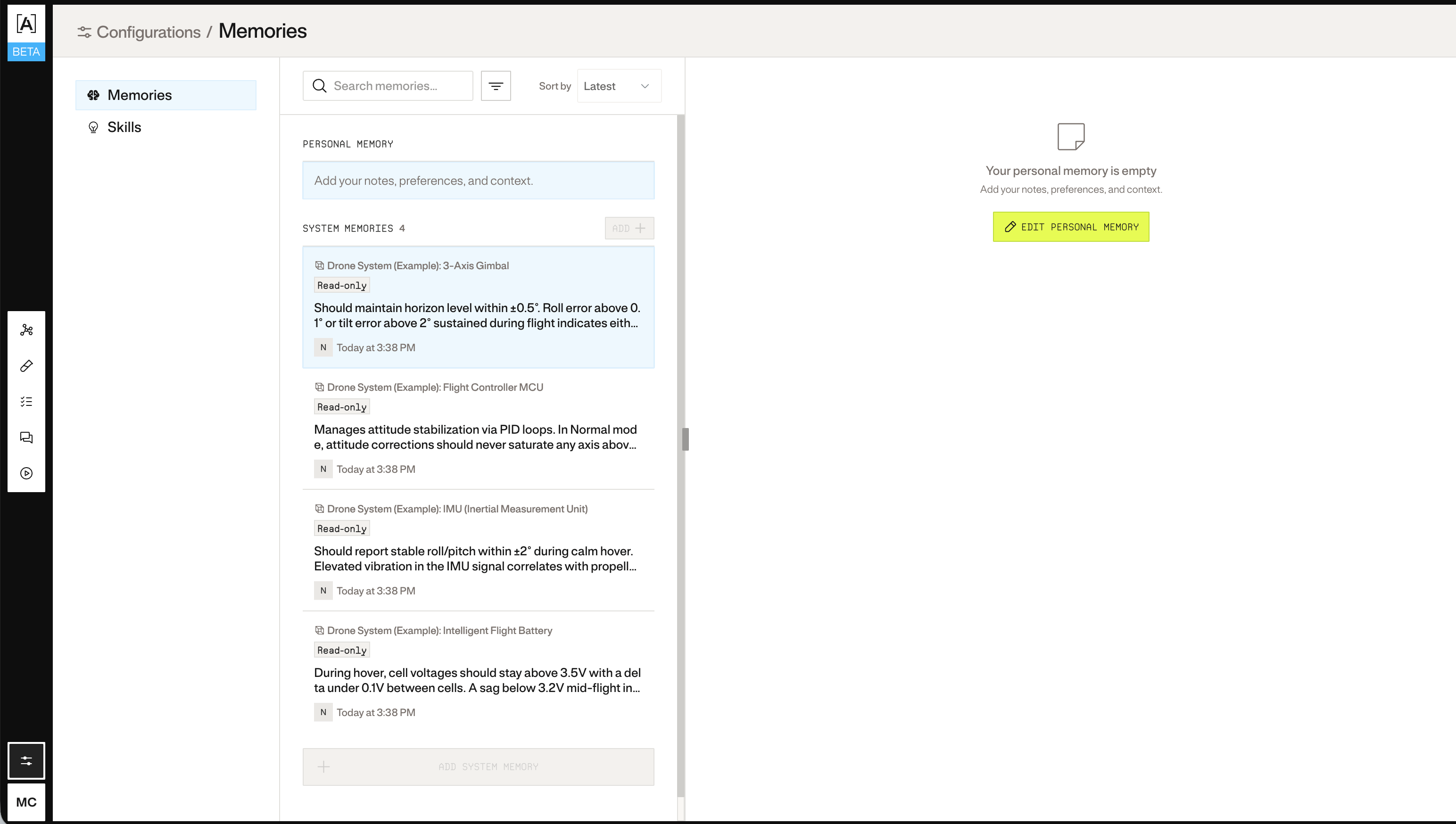
## Adding a system memory
System memories are domain knowledge attached to entities in the metagraph: behavioral quirks, design decisions, known failure modes. Atlas draws on these when reasoning about the system.
To add a memory to an entity, you need the system ID and entity ID. You can look up entity IDs from the metagraph:
```bash theme={null}
curl "https://nokia.atlas.arenaphysica.com/api/v1/systems/$SYSTEM_ID/entities" \
-H "Authorization: Bearer $ATLAS_TOKEN"
```
Then write the memory:
```bash theme={null}
curl -X PUT "https://nokia.atlas.arenaphysica.com/api/v1/systems/$SYSTEM_ID/entities//memories" \
-H "Authorization: Bearer $ATLAS_TOKEN" \
-H "Content-Type: application/json" \
-d '{
"content": "Known temperature sensitivity above 85°C. Readings drift ~0.5 deg/s per degree above threshold. Compensate in firmware."
}'
```
Memory writes are versioned. You can view history and restore a previous version:
```bash theme={null}
# View history
curl "https://nokia.atlas.arenaphysica.com/api/v1/systems/$SYSTEM_ID/entities//memories/history" \
-H "Authorization: Bearer $ATLAS_TOKEN"
# Restore a previous version
curl -X POST "https://nokia.atlas.arenaphysica.com/api/v1/systems/$SYSTEM_ID/entities//memories/restore" \
-H "Authorization: Bearer $ATLAS_TOKEN" \
-H "Content-Type: application/json" \
-d '{"version": }'
```
## Adding a personal skill
A personal skill is scoped to your account. It defines a procedure or analytical framework Atlas will follow when you invoke it.
```bash theme={null}
curl -X POST "https://nokia.atlas.arenaphysica.com/api/v1/skills" \
-H "Authorization: Bearer $ATLAS_TOKEN" \
-H "Content-Type: application/json" \
-d '{
"name": "power-budget-analysis",
"description": "Standard procedure for analyzing power budget violations.",
"scope": "user",
"power_command": "power-budget-analysis",
"instructions": "When analyzing power issues:\n1. Check rail voltages against nominal spec.\n2. Identify load contributors sorted by draw.\n3. Flag any component exceeding 90% of its rated power.\n4. Check for inrush at startup."
}'
```
Save the `uuid` from the response:
```bash theme={null}
export SKILL_ID=""
```
**Field reference:**
| Field | Description |
| --------------- | -------------------------------------------------------------- |
| `name` | Kebab-case identifier, max 64 characters |
| `description` | What the skill does, max 1024 characters |
| `scope` | `user` for personal, `global` for org-wide |
| `power_command` | The slash-command name Atlas will recognize (no leading slash) |
| `instructions` | The procedure Atlas follows when this skill is active |
To update a skill later:
```bash theme={null}
curl -X PATCH "https://nokia.atlas.arenaphysica.com/api/v1/skills/$SKILL_ID" \
-H "Authorization: Bearer $ATLAS_TOKEN" \
-H "Content-Type: application/json" \
-d '{"instructions": ""}'
```
***
## Adding a system memory
System memories are domain knowledge attached to entities in the metagraph: behavioral quirks, design decisions, known failure modes. Atlas draws on these when reasoning about the system.
To add a memory to an entity, you need the system ID and entity ID. You can look up entity IDs from the metagraph:
```bash theme={null}
curl "https://nokia.atlas.arenaphysica.com/api/v1/systems/$SYSTEM_ID/entities" \
-H "Authorization: Bearer $ATLAS_TOKEN"
```
Then write the memory:
```bash theme={null}
curl -X PUT "https://nokia.atlas.arenaphysica.com/api/v1/systems/$SYSTEM_ID/entities//memories" \
-H "Authorization: Bearer $ATLAS_TOKEN" \
-H "Content-Type: application/json" \
-d '{
"content": "Known temperature sensitivity above 85°C. Readings drift ~0.5 deg/s per degree above threshold. Compensate in firmware."
}'
```
Memory writes are versioned. You can view history and restore a previous version:
```bash theme={null}
# View history
curl "https://nokia.atlas.arenaphysica.com/api/v1/systems/$SYSTEM_ID/entities//memories/history" \
-H "Authorization: Bearer $ATLAS_TOKEN"
# Restore a previous version
curl -X POST "https://nokia.atlas.arenaphysica.com/api/v1/systems/$SYSTEM_ID/entities//memories/restore" \
-H "Authorization: Bearer $ATLAS_TOKEN" \
-H "Content-Type: application/json" \
-d '{"version": }'
```